

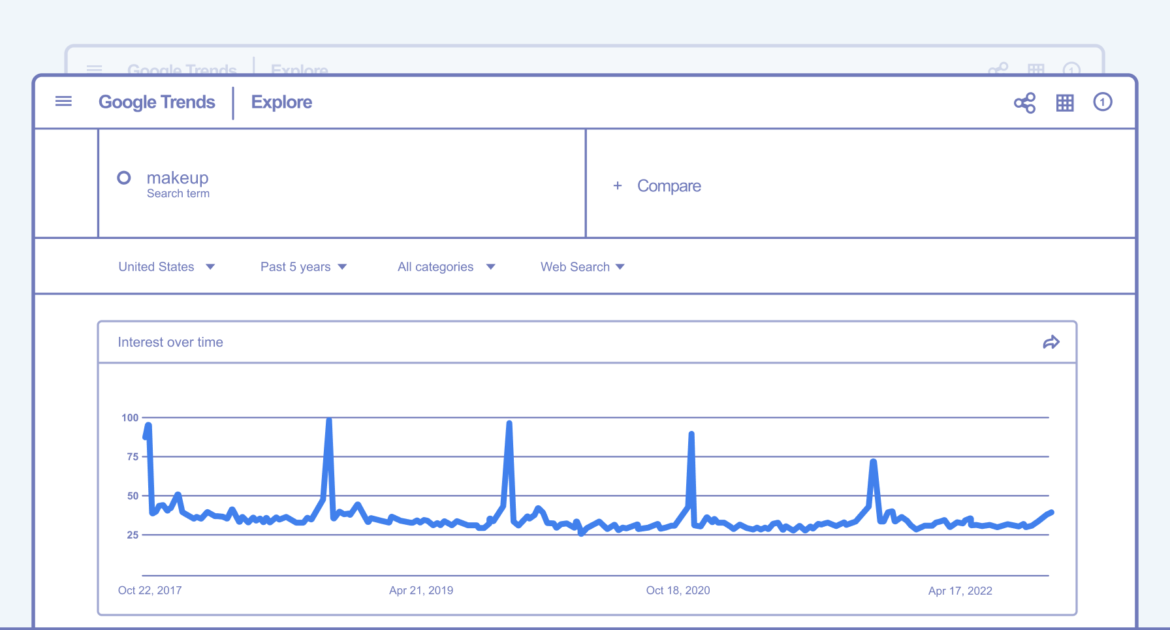
1. Google Trends: Identify Timing and Rising Topics
Google Trends is the primary tool for visualizing when search interest for a topic peaks.
- The Explore Tool: Enter a broad industry term (e.g., “winter coats”) and set the timeframe to “Past 5 Years” to identify recurring annual peaks.
- “Trending Now” Page: Use this to monitor daily or real-time spikes in interest across 100+ countries, with data refreshed every 10 minutes.
- Related Queries & Rising Keywords: Scroll to the bottom of your search results to find “Rising” terms, which show a significant percentage increase in search frequency, helping you spot emerging 2025 trends before they peak.
2. Google Keyword Planner: Forecast Search Volume
Available within a Google Ads account (free to use without running ads by selecting “Expert Mode”), this tool provides specific volume data.
- Historical Metrics: View monthly search volume trends over the last year to see exactly which months have the highest demand.
- Custom Date Ranges: Use the date range feature to compare search volume for specific seasonal periods (e.g., holiday season 2024 vs. 2025).
- Keyword Forecasts: Access daily-refreshed forecasts based on the last 7–10 days of data to see how current market shifts might impact upcoming peak seasons.
3. Google Search Console (GSC): Analyze Your Own Peaks
GSC helps you understand how your specific audience responds to seasonal changes.
- Integrated Insights (2025 Update): A new unified Search Console Insights dashboard launched in June 2025 blends GSC and GA4 data, making it easier to spot trending content and queries on your site.
- Year-over-Year (YoY) Comparisons: Use the Performance report to compare your clicks and impressions from the current peak season to the previous year. This confirms if traffic changes are due to industry seasonality or site performance.
4. Google Merchant Center: Retail-Specific Trends
For e-commerce, the Google Merchant Center provides a “Best Sellers” report (free) that shows which products are currently trending across Google and how they compare to your own inventory.


3 Comments
This is exactly what i was looking for, thank you so much for these tutorials
It would be great to try this theme for my businesses
What a nice article. It keeps me reading more and more!